
What's New
The headline changes in recent Paddock releases, newest first. These are the things you’ll notice — not an exhaustive changeset. For the full, per-package detail see the changelogs on GitHub (server, web).
A theme runs through this stretch: Paddock grew from a place to chat with agents into a place where agents run on their own — fired by events and schedules, spawning and reporting back to each other — with the UI making all that unattended work legible at a glance. With 0.46 the boundary opens the other way as well: Paddock is now something you can drive from outside, over an MCP endpoint and a published HTTP API, carrying its own credentials and its own read-only-by-default policy rather than borrowing your proxy’s. An instance is becoming less an app you visit and more a service your other tools talk to.
0.47 — The chat list learns who spawned whom
Section titled “0.47 — The chat list learns who spawned whom”-
Spawned chats now nest under the chat that created them. The sidebar was the last place a fan-out still looked like a flat pile: a keeper that split work eight ways gave you eight top-level rows, in no obvious relationship to each other or to the chat that started it. Now a chat sits underneath its parent, indented, with a twisty to fold the whole family away and a count pill telling you how many chats you just folded. Everything starts expanded, and what you collapse is remembered per project, in that browser — folding a noisy fan-out on a laptop shouldn’t fold it on a phone.
The tree also changes how the list sorts. Siblings order by the most recent activity anywhere in their subtree, so a parent rises with its working children instead of sinking while they run, and a starred chat now floats to the top of its own group rather than the top of everything. A nested chat drops its violet
spawnedbadge, since sitting under its parent says the same thing more loudly — it keeps the badge on the rare occasion it’s shown at the top level, because its parent is archived, in another project, or filtered out by a search. Search pulls a match’s ancestors along with it so you can see where a hit sits, and temporarily ignores what you’d folded.The edge behind all this is recorded on the chat’s provenance at creation, so it’s the same data that already drove the origin badges — now shaping the list rather than just decorating it. Forks record it too, nesting under the chat they were forked from. Chats you start yourself, and chats fired by a schedule or an event hook, stay roots: they weren’t created by another chat. There’s no migration for chats that predate this, so Paddock falls back to inferring the parent from who injected the chat’s opening prompt — which recovers most existing spawned chats, though a fork made with no kickoff prompt left no trace to recover and stays flat.
0.46 — Drive Paddock from outside
Section titled “0.46 — Drive Paddock from outside”- An external MCP client can now drive Paddock. The management operations are
served over a streamable-HTTP MCP transport at
/mcp, so a Claude Code session on your laptop — and eventually a peer Paddock — can list projects, read chats and, with the scope for it, start turns, all bounded by the credential it presents. External callers get the same toolset a keeper receives in-process rather than a parallel one, so adding a self-management tool exposes it over/mcpfor free and the two surfaces can’t drift. The transport is stateless — a fresh server per request, no session store, restarts transparent — and publishes RFC 9728 discovery metadata once you’ve configured an authorization server. - Management auth stands on its own, and is read-only by default. Paddock
authenticates
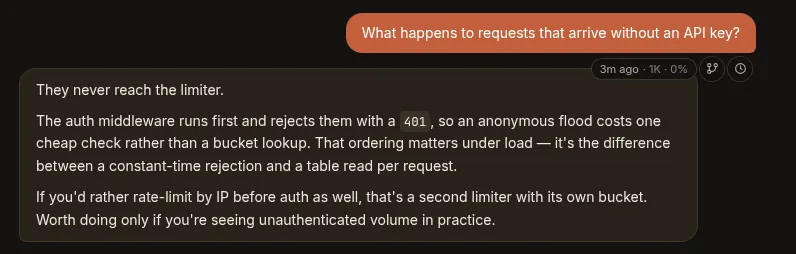
/mcpitself, independent ofPADDOCK_AUTH_MODEand of any reverse proxy, so the endpoint stays credential-gated even on an instance runningauth.mode: none. Policy is enforced at the operations layer rather than per-transport, so every future access path inherits identical scoping instead of reimplementing it. Client tokens are referenced, never inlined —auth: { ref: "env:VAR" }, and a literal secret in the config file is a hard error. A client configured without an explicit scope gets read-only on purpose: any write scope can start keeper turns, and a keeper hasBash, so granting one is effectively remote code execution on the host. The whole thing fails closed —/mcp404s until clients and a public URL are configured, and a bad credential gets a401, never a redirect to a login page no MCP client can follow. - Hover a message to see when it happened — and how full the window was. Hovering any message in a transcript reveals a small rail at its top-right showing that message’s timestamp and the context-window fill as of that point. It’s a point-in-time read rather than a running total, so on a long chat you can finally see where the window actually filled up, and whether what you’re reading is from minutes or days ago.
- Fork or rewind from any point in a chat. The same rail carries two actions.
Fork from here starts a new chat containing only the transcript up to that
message, leaving the original untouched — so you can try a second approach from
the moment things diverged. Revert to here truncates the chat in place: it
keeps the session id, so the URL and lineage survive, and backs the discarded
tail up to a
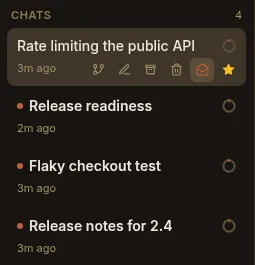
.reverts/sidecar. The confirm dialog counts the messages and tool calls about to disappear and says plainly what reverting does not undo — files written, PRs opened, messages sent all stay done. You’re rewinding the conversation, not the world. - Mark a conversation unread. A sixth action on each chat row toggles its read state, borrowing the email-client move for “I glanced at this at midnight, resurface it in the morning” — marking a read chat unread re-raises its accent dot in the list. The flag is per-user rather than shared like starring and archiving, since “I haven’t dealt with this yet” is personal, and opening or focusing the chat spends it.
- An API reference, generated from the code. Every REST route now carries a
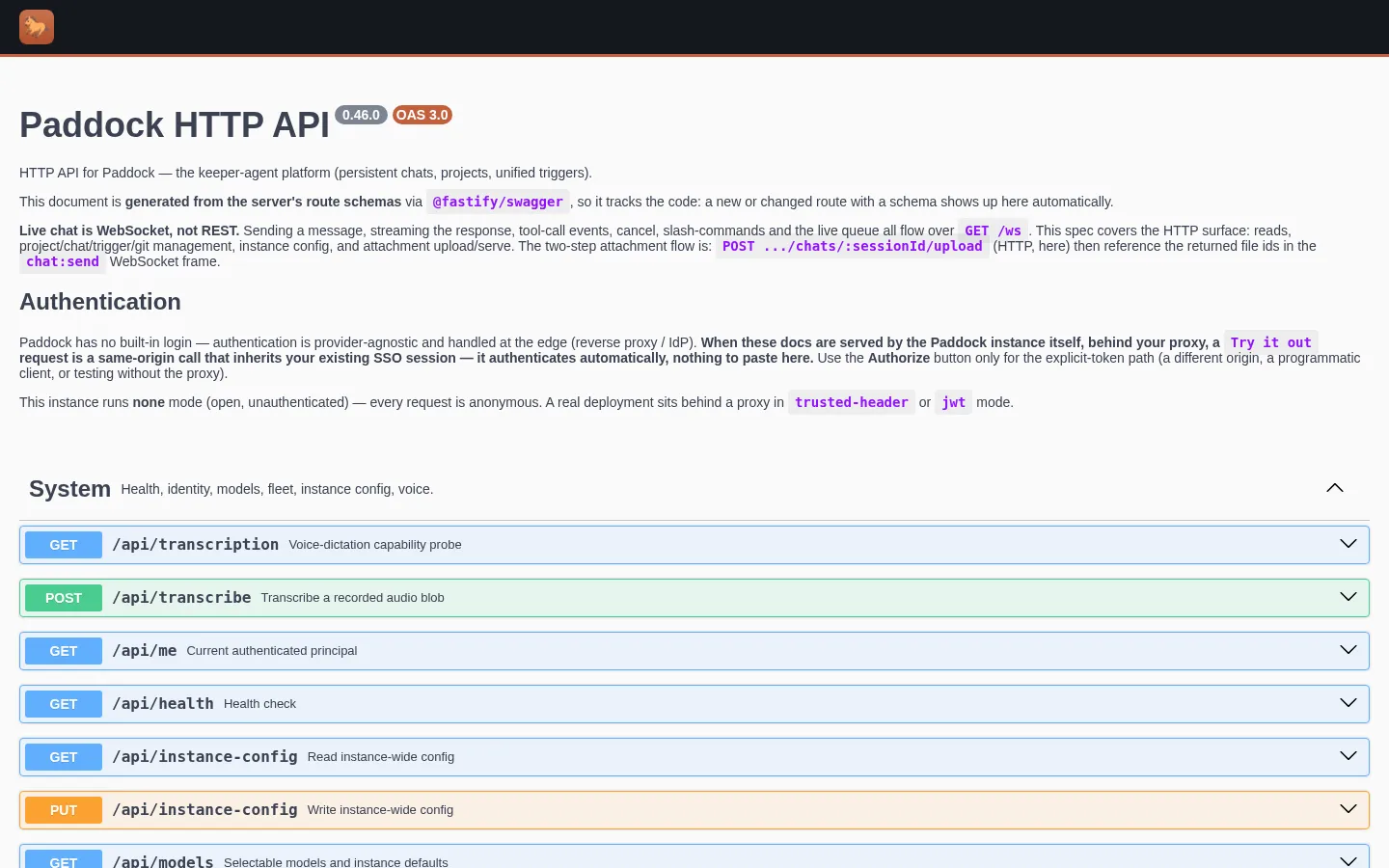
schema, collected into a live OpenAPI 3 document. Set
PADDOCK_OPENAPI_ENABLED(off by default) and a Paddock-branded Swagger UI mounts at/open-api— raw spec at/open-api.json— reachable from a new Swagger API link in the sidebar, with an Authorize button that reflects your instance’s auth mode. A static copy is published on this site too, as the API reference. (The sidebar’s “Instance settings” is now just Settings.)
- Keepers can create projects. A new
create_projectself-management tool lets an agent provision a project rather than stopping to ask you to click New project — a notebook, or repo-backed by passing a git URL, which clones into a nested checkout and rolls back cleanly if the clone fails. It’s gated behind its ownPADDOCK_SELF_MCP_PROJECTSflag, off by default: unlike every other write tool it creates instance-level state and clones a URL the caller supplied, so it deliberately doesn’t ride along on the general write gate.
0.45 — Opus 5, and a configurable model list
Section titled “0.45 — Opus 5, and a configurable model list”- Claude Opus 5 is the default keeper model.
claude-opus-5heads the model picker — a 1M-token context window at the same per-token price as Opus 4.8, with markedly better verification-and-iteration behaviour for the money. New projects and any keeper you haven’t overridden run on it now.claude-opus-4-8stays selectable for regression comparison or prompts tuned to its behaviour, and the sweeper keeps its cheaper Haiku default, so curation costs the same as before. - Choose which models your instance offers. The picker used to show every
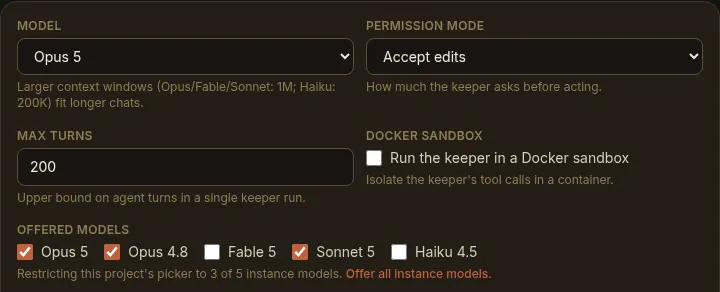
model in the built-in catalog. An instance can now set an allow-list — the
PADDOCK_MODELSenvironment variable (comma-separated ids), amodels:list inpaddock.config.yaml, or the field on the Settings screen — and each project’s Settings tab can narrow it further, though a project may only subset what the instance offers. Leave it unset and every catalog model is offered, exactly as before. The catalog still owns each model’s context limit and pricing, so an allow-list picks from it by id and can’t misconfigure them.
- A queued follow-up is no longer dropped. Type a second message while the keeper is still replying and it now reliably sends once the turn lands. In session mode a turn that produced a complete reply can still report failure in its trailing result frame; the queue drain — along with the post-turn curation sweep and the recovery watch — took that at face value and silently discarded the message. A real reply now supersedes a benign trailing failure, while a genuinely dead turn still holds its queue and keeps its error banner.
releases/latest/download/…resolves at last. Each GitHub Release now carries a stable-namedpaddock-latest.tgz(and its.sha256) alongside the version-named tarball, so a self-hoster or a deploy recipe can fetch the newest build from a fixed URL — GitHub’slatest/downloadredirect only works when the filename is identical across every release. Pinpaddock-<version>.tgzinstead when you’d rather not float.
0.44 — Two official images & ready-made deploy recipes
Section titled “0.44 — Two official images & ready-made deploy recipes”- Two published images. The Docker build now ships as two tags from the
same source:
ghcr.io/edspencer/paddock:latest— the lean base image (app +git,gh, theclaudeCLI) — andghcr.io/edspencer/paddock:devbox, which layers the coding-agent toolbox on top (pm/PM2 preview servers,ffmpeg, a headless Playwright browser, the Docker CLI). Same app and/datalayout, so you can swap tags against one volume. See Getting started and The Dev Box flavor. - A recipes repo. Self-hosting recipes now live in their own public repo,
paddock-deploy:docker/(base + devbox compose),proxmox-iac/(Tofu + Ansible for a dev box or home box),kubernetes/(Kustomize manifests), andauth-basic/(a Caddy Basic Auth sidecar →trusted-header). The Deploying, Proxmox (LXC), Kubernetes, and Securing guides each point at the matching recipe. - Safe-by-default binding. A fresh source/tarball run now binds
127.0.0.1(loopback only) and refuses to expose itself without either a real auth mode or an explicitPADDOCK_DANGEROUSLY_ALLOW_OPENopt-in. Container images still bind0.0.0.0(the network namespace is their boundary); the recipes carry the host-side publish posture. - Live nested sub-agent cards. When a keeper spawns sub-agents — even several levels deep — each one now renders as its own live card that fills in as it runs: a running spinner, streaming progress, and a cost that rolls its descendants’ costs up into the parent. Nested unattended work is legible while it happens, not just after a refresh.
0.43 — Background work that outlives the turn
Section titled “0.43 — Background work that outlives the turn”- Background tasks survive the turn boundary. In session mode, work a keeper
kicks off in the background — a
run_in_backgroundsub-agent or shell, a build, a deploy, a scheduled wake-up — now keeps running when the turn that started it ends, and delivers its result live the moment it finishes, waking the keeper to continue or report back. No reload, and no more work lost to Paddock’s own turn teardown. This is what makes “kick off something slow, get pinged when it’s done” reliable for keepers. A task can still be killed from further upstream — that case is unchanged, and it’s what keeper-chat recovery is for.
0.42 — Instance settings, curation budgets & pinned files
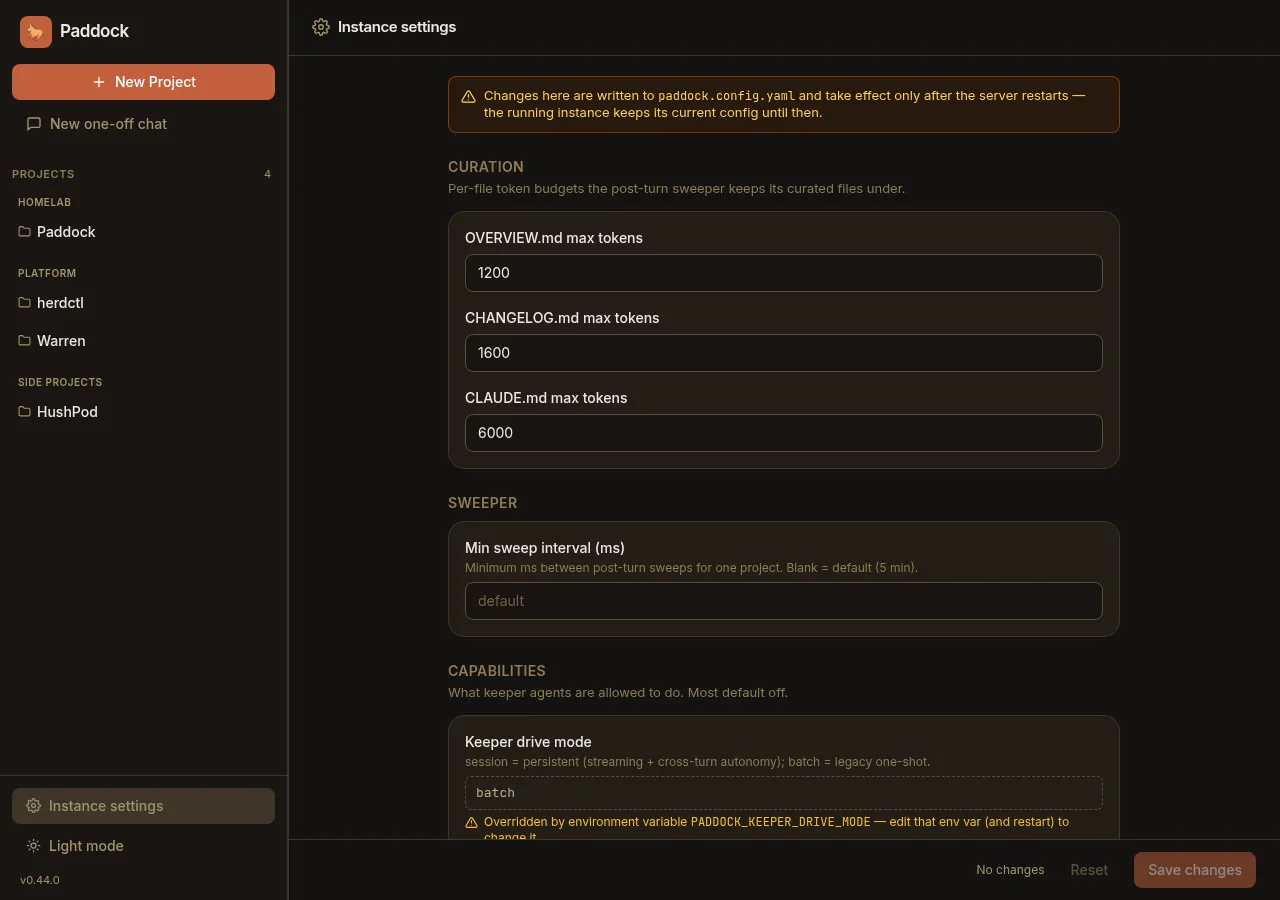
Section titled “0.42 — Instance settings, curation budgets & pinned files”- An instance-wide Settings screen. A new top-level Instance settings
screen (the gear in the sidebar) edits your
paddock.config.yamlstraight from the UI — grouped fields for curation, capability gates, auth, attachments and more. Instance config is read once at boot and frozen, so a save writes the file and shows a restart-to-apply banner; a field already pinned by an environment variable renders read-only with an “overridden byENV” note, so the precedence is never a surprise.
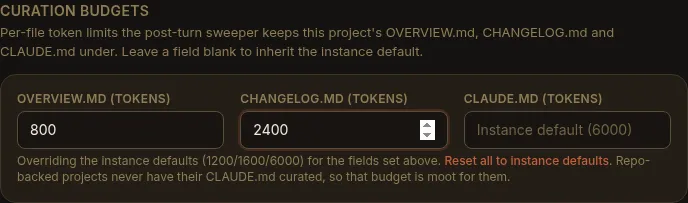
- Per-project curation budgets. Each project’s Settings tab can now cap the
post-turn sweeper’s per-file token budgets — how big it lets
OVERVIEW.md,CHANGELOG.mdandCLAUDE.mdgrow — or leave a field blank to inherit the instance default. Lower a budget to shrink the context a chatty project injects into every one of its chats.
- Pin any file as a tab — at any depth. The Files browser’s pin now works on a file anywhere in the tree, including nested ones; a pinned file rides along as a persistent tab in the project header next to Home / Chat / Files, one click from whatever you keep coming back to.

0.41 — Pinned chats, resizable panes & a smarter sweeper
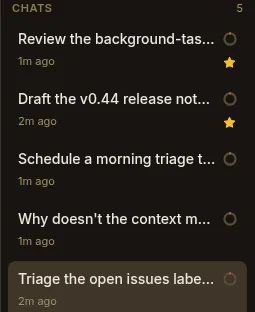
Section titled “0.41 — Pinned chats, resizable panes & a smarter sweeper”- Star a chat to pin it. Star any chat and it floats to the top of its list — a lightweight way to keep the conversation you’re living in (or the run you’re waiting on) one click away. Starring is purely presentational and independent of archiving: starred chats float to the top of both the active and the archived sections.
- Draggable, persisted pane widths. Grab the divider to resize the side-nav and the chat-list column to taste; your widths are remembered in the browser across reloads, so the layout you like stays put.
- A one-row mobile header. On a phone the project header collapses to a single row and the composer typography was tidied up, so the small-screen layout stops fighting for vertical space.
- The sweeper is a full-file curator. Post-turn curation now rewrites the
whole
OVERVIEW.md/CHANGELOG.mdto stay within a token budget, instead of only ever appending — so those files stay tight and readable rather than growing without bound. (0.42’s per-project budgets tune exactly these limits.)
0.40 — Promote a notebook to a repo, dictate while it types
Section titled “0.40 — Promote a notebook to a repo, dictate while it types”- Promote a notebook project to repo-backed, in place. A notes-only project can
now be turned into a full code project without recreating it: point it at a git
repo and Paddock clones it as the keeper’s working directory — the repo’s own
CLAUDE.md, branches and PR flow take over from there — keeping the project’s history and chats. - Dictate while the keeper is replying. The composer’s microphone stays usable during a streaming reply, so you can start dictating your next message while the agent is still writing its last one — no waiting for the turn to land.
0.39 — Dead-end turns, made legible
Section titled “0.39 — Dead-end turns, made legible”- Turn errors and usage-limit hits surface in the UI. A keeper turn can stop without a normal reply — a subscription/usage-limit hit, the max-turns cap, or an outright error. These used to leave a chat looking mysteriously dead. Each now shows a distinct inline notice: a usage-limit note with the reset time, a turn-limit note with a Continue button, or an error with Retry.

- Run-now + live status for triggers. The Triggers tab regained a Run now action to fire any schedule or event on demand, plus live run-status and Last/Next-run columns — so you can test a trigger and watch it go without waiting for its clock.
- Spawned chats can pick their model. The
create_chat/ fork self-management tools can now set the model of the chat they spawn, so a manager keeper can send cheap work to a smaller model and hard work to a bigger one. - Client-local slash commands render.
/contextand/usagenow show their formatted output inline instead of an empty (or raw-XML) bubble.
0.38 — Send files & images to a keeper
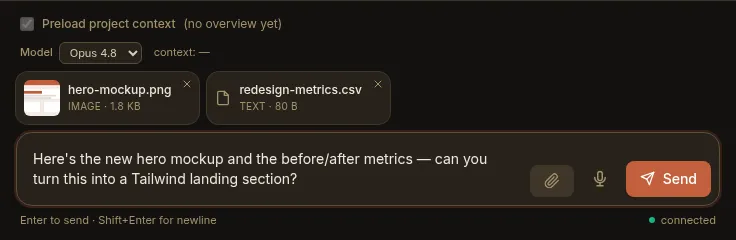
Section titled “0.38 — Send files & images to a keeper”- Attachments in the composer. Attach files and images to a message — pick them with the paperclip, drag & drop onto the composer, or paste (⌘V / Ctrl+V) a screenshot straight in. Staged files sit in a removable tray; images preview as thumbnails, everything else as a chip. The keeper reads them directly — native vision on images and PDFs, plain-text reads on the rest — and sent files stay with the chat, re-rendering on reload. Per-instance and per-project caps (default 25 MB/file, 10 files/message, all types) keep it sane. See Sending files & images.
0.37 — Triggers, unified
Section titled “0.37 — Triggers, unified”- One Triggers tab. The per-project Hooks tab and the Settings → Schedules section merged into a single Triggers list. Every trigger type — schedule, event, and the reserved webhook — lives in one place, each row showing its type, its firing condition, a capability summary, and an enabled toggle.
- One self-management surface. The old
set_hook/set_scheduletool families are replaced by unifiedset_trigger/list_triggers/remove_trigger, carrying the trigger type, its run, and enabled — so a keeper declares any kind of trigger the same way. - Schedules can be scoped. A schedule that declares a tool allow-list now runs on its own scoped agent with just those tools (like an event trigger); a schedule with no tools keeps running as the keeper, as before.
- The sweeper is a trigger. Post-turn curation is now the implicit default
curate-overviewtrigger — declare one to give a project a bigger model or extra instructions, or disable it entirely. Undeclared projects curate exactly as before. See The sweeper.
0.36 — Streaming, and session mode by default
Section titled “0.36 — Streaming, and session mode by default”- Token-by-token streaming. In session mode a keeper’s reply now accretes into the live bubble as it’s written, instead of appearing all at once when the turn finishes. (Batch mode still renders each message whole.) See Token-by-token streaming.
- Session mode is the default. A fresh instance now drives keeper turns through
the persistent session (SDK) runtime by default, so cross-turn autonomy
(
ScheduleWakeup,/loop) and streaming work out of the box.PADDOCK_KEEPER_DRIVE_MODE=batch(and the per-projectdriveMode) still switch back to the one-shot path. - The trigger foundation. Under the hood, hooks and schedules were unified onto
one discriminated trigger model (
schedule/event/webhook) over a single execution core — the groundwork the 0.37 Triggers tab is built on.
0.35 — Keepers that unstick themselves
Section titled “0.35 — Keepers that unstick themselves”- Keeper-chat recovery. When a keeper starts a background task and ends its turn while it’s still running, the task can be killed at the turn boundary and leave the keeper idle-but-alive. Paddock now surfaces that as a distinct amber “background task terminated — the keeper is idle” affordance with a one-click Continue that wakes the keeper to finish or report. An optional automatic re-drive (off by default) does the same without you. See Keeper-chat recovery.
0.34 — Event hooks
Section titled “0.34 — Event hooks”- Event hooks. Run an agent turn automatically when a lifecycle event fires.
The first event is
onArchive— when a chat is archived, each of the project’s enabled hooks fires as its own agent. A hook’s granted tools are its capability: a hook that must tidy up is givenBashand does the work itself. New hooks start disabled, so nothing runs until you arm it. - Hook chats are visible and legible. A hook run shows up in the chat list with a small lightning-bolt badge, and opening it floats a read-only banner telling you it’s a hook agent, what event triggered it, and exactly which tools it was granted.
- Manage hooks from a chat. Keepers with the opt-in hook MCP can declare,
edit, and remove their own hooks (
list_hooks/set_hook/remove_hook). - Steer the sweeper per project. Drop a
.paddock/hooks/sweep.mdfile in a project and its contents are appended to the sweeper’s instructions — so each project can shape how itsOVERVIEW.md/CHANGELOG.mdget curated.
0.33 — Who sent this, and a lighter stream
Section titled “0.33 — Who sent this, and a lighter stream”- Per-message attribution. Machine-injected turns now say who added them —
”↩ sent by ⟨chat⟩” for a
send_messagefrom another chat, or ”⏰ scheduled by ⟨name⟩” for a schedule fire. Human-typed messages stay unlabelled. An injected message also streams into an already-open chat immediately, no refresh needed. - Schedule yourself from a chat. New self-management tools let a keeper create
and manage its project’s durable schedules (
set_schedule/remove_schedule/list_schedules) — “schedule yourself to triage issues every morning” — not just a human clicking through Settings. - Cheaper streaming. The CPU cost of watching a chat stream dropped sharply:
the continuous 60fps animations were trimmed, respect
prefers-reduced-motion, and pause while the tab is in the background.
0.32 — Schedules & run history
Section titled “0.32 — Schedules & run history”- Scheduled chats. A project can declare schedules (cron or interval) that start a chat on their own. A scheduled run is a first-class chat — it streams live, is re-attachable, and a human can open it and keep the conversation going. Manage them from a Schedules section in the project’s Settings, including enable/disable and trigger-now.
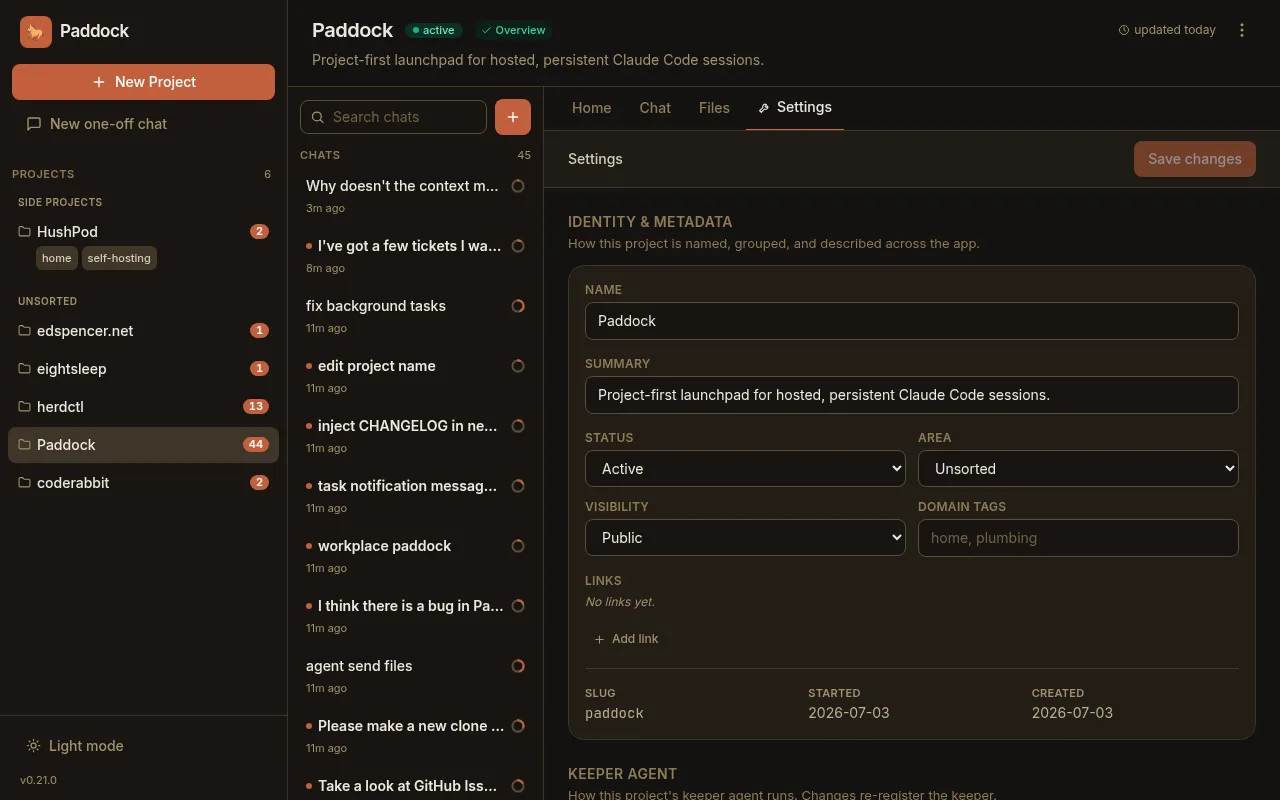
- “While you were away.” A new project History tab lists recent runs with their origin (human / scheduled / spawned), flags the ones that are new since you last looked, and banners how many ran unattended — so cron-fired and agent-spawned work is easy to find and open.
0.31 — Provenance, spawn-depth & YAML config
Section titled “0.31 — Provenance, spawn-depth & YAML config”- Provenance badges. The chat list marks scheduled and spawned chats with a subtle icon, so the runs that happened without you stand out from the ones you started. Human chats stay unadorned.
- Spawned children can report back. A chat spawned by another chat now gets the
self-management tools (bounded by a new
maxSpawnDepth, default1), so a child cansend_messageits parent when it’s done — enabling the manager-agent pattern without runaway recursion. - Configure an instance from a YAML file. Instead of a long list of
PADDOCK_*environment variables, an instance can keep its settings in a singlepaddock.config.yaml— with environment variables still overriding the file. Env-only deployments are unaffected.
0.30 — Files, Changes & self-archiving
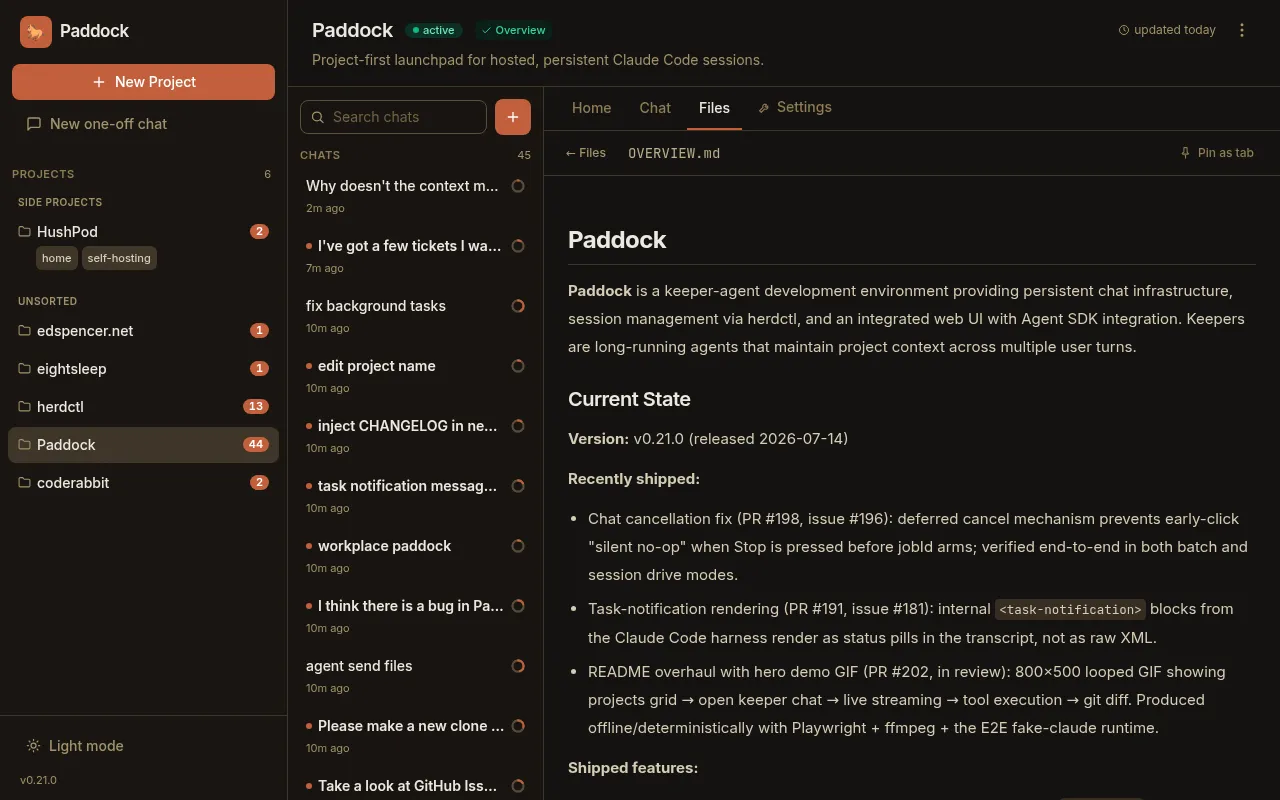
Section titled “0.30 — Files, Changes & self-archiving”- Browse into subdirectories. The Files tab now lets you click into folders,
with deep-linkable, refresh-safe URLs and a breadcrumb — so anything a project
filed under
design/,docs/, etc. is finally reachable. - Selective commits. The Changes tab gained a checkbox per changed file (with
select-all/none) and a “Commit N selected” action, a
+A −Rline stat per file, and a dirty-file count on the projects grid so pending work is visible before you open a project. - Agents can archive themselves. New
archive_chat/unarchive_chatself-management tools power the “do the work, then archive myself on success; leave un-archived on failure so a human sees it” convention.
0.29 — First-class MCP tool rendering
Section titled “0.29 — First-class MCP tool rendering”- Paddock’s own tools render as first-class UI. Every
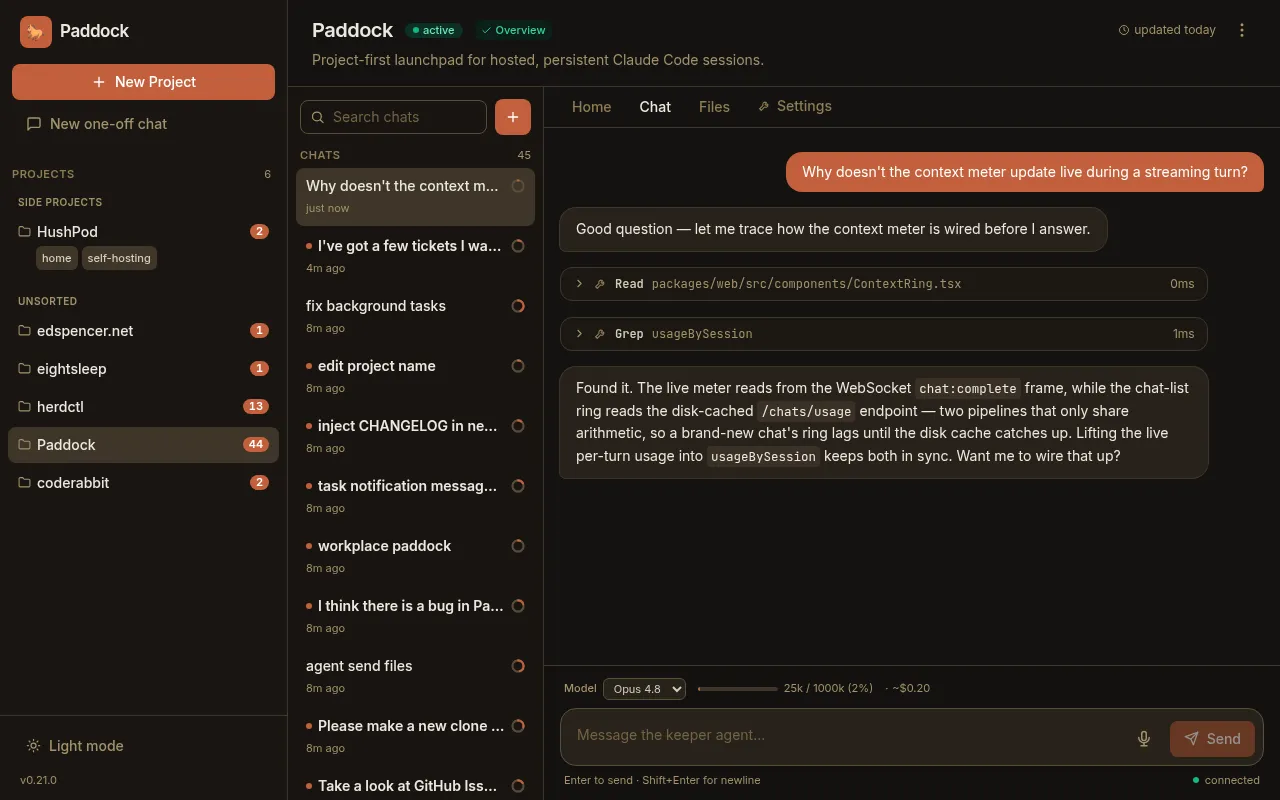
mcp__…tool call now shows a humanized name (mcp__paddock_manage__create_chat→ “Create chat”) with a brand badge instead of the raw string, and thepaddock_managetools get rich bodies parsed from their output — project chips, a chat list with live running dots, transcript previews — that link straight into the chats they touched.
Maintaining this page: add a short, user-facing entry here whenever you cut a release (see RELEASING.md).